Step-by-Step Guide: How to Create a Blog in WordPress for Beginners
Step-by-Step Guide: How to Create a Blog in WordPress for Beginners
Jul 21, 2023

Step-by-Step Guide: How to Create a Blog in WordPress for Beginners
1. Introduction to WordPress and its Benefits for Beginners
Starting a blog can be an exciting journey, and WordPress is a powerful platform that can make this process simple and enjoyable even for beginners. In this step-by-step guide, we will explore the process of creating a blog in WordPress from scratch. Whether you are a hobbyist, writer, or entrepreneur looking to establish an online presence, WordPress offers a user-friendly interface, flexibility, and a plethora of customizable options to help you create a professional and engaging blog. By following this guide, you will learn everything you need to know to set up your WordPress blog, customize its appearance, craft compelling content, manage categories and tags, utilize plugins and widgets, and promote your blog to reach a wider audience. Let's get started on your journey to becoming a successful blogger with WordPress.
How to create a blog in WordPress: what you’ll need
To create a blog in WordPress, here's what you'll need:
- Internet access: Ensure you have a stable internet connection to access the WordPress website and create your blog.
- Email address: You'll need a valid email address to sign up for a WordPress account. This email address will be used for account verification and communication purposes.
- Web browser: Choose a web browser of your preference, such as Google Chrome, Mozilla Firefox, or Safari, to access the WordPress website and create your blog.
- Content ideas: Before you start creating your blog, it's helpful to have some content ideas in mind. Think about the topics you want to write about and the target audience you want to reach.
- Domain name (optional): While not necessary, having a custom domain name can give your blog a more professional and personalized touch. You can either purchase a domain name through WordPress or use a free domain with a WordPress subdomain.
- Hosting plan (optional): If you want more control and flexibility over your blog, you may consider purchasing a hosting plan. WordPress offers various hosting options that provide additional features and customization capabilities.
Remember, these are the basic requirements to get started with creating a blog in WordPress. Once you have these in place, you can proceed to sign up for a WordPress account, choose a domain name, select a hosting plan (if desired), and start building your blog.
1. Introduction to WordPress and its Benefits for Beginners
1.1 What is WordPress?
So, you've decided to dip your toes into the world of blogging. First things first, let's talk about WordPress. In a nutshell, WordPress is a popular and user-friendly content management system that allows you to create and manage your own website or blog without needing to know how to code. It's like having your very own slice of the internet cake, but without the hassle of baking it yourself.
1.2 Why Choose WordPress for Blogging?
Now, you might be wondering why you should choose WordPress for your blogging journey. Well, let me break it down for you. WordPress offers a plethora of benefits for beginners (and seasoned bloggers too!). It's incredibly customizable, with thousands of free and premium themes to choose from, so you can make your blog look exactly how you envision it. It's also SEO-friendly, meaning your blog has a better chance of being discovered by search engines and attracting more readers. Plus, there's a vibrant community of WordPress users who are always ready to help you out if you get stuck. So, with WordPress, you'll be well-equipped to tackle the blogging world like a pro.
2. Choosing a Domain Name and Hosting Provider
2.1 Understanding the Importance of a Domain Name
Alright, now that we've covered the basics of WordPress, let's move on to the next step: choosing a domain name. Your domain name is the unique address that people will use to access your blog. It's like your blog's street address in the vast online neighborhood. So, make sure to choose a domain name that reflects your blog's identity and is easy to remember. You want to stand out from the crowd, but in a good way.
How do I choose a domain name for my blog? When choosing a domain name for your blog, consider something that is memorable, relevant to your blog's topic, and easy to spell. You can either purchase a custom domain through WordPress or use a free domain with a WordPress subdomain.
2.2 Selecting a Reliable Hosting Provider
Once you've got your domain name in mind, the next thing you'll need is a hosting provider. Think of a hosting provider as a landlord who rents out space on the internet for your blog to reside. You want a reliable and trustworthy landlord, right? That's why it's crucial to choose a hosting provider that offers excellent uptime, fast loading speeds, and responsive customer support. After all, you don't want your blog to be stuck in an online traffic jam.
3. Installing WordPress and Setting up Your Blog
3.1 Creating a WordPress Account
Now that you've secured your domain name and chosen a hosting provider, it's time to bring WordPress into the picture. To get started, head over to the WordPress website and create an account. It's a piece of cake, really. Just fill in a few details, click a couple of buttons, and voila! You're on your way to WordPress stardom.
3.2 Installing WordPress on Your Hosting Platform
With your WordPress account at the ready, it's time to install WordPress onto your hosting platform. Don't worry; this sounds fancier than it actually is. Most hosting providers offer a one-click WordPress installation, making the process as easy as ordering takeout. Just follow the step-by-step instructions provided by your hosting provider, and you'll have WordPress up and running in no time.
3.3 Configuring Basic Settings for Your Blog
Congratulations! You're now the proud owner of a WordPress-powered blog. Now, let's make sure everything is set up just the way you like it. Take some time to explore the basic settings in your WordPress dashboard. You can customize your blog's title, tagline, and other essentials to make it truly yours. Don't forget to save your changes, because as we all know, saving is caring.
4. Exploring WordPress Themes and Customization Options
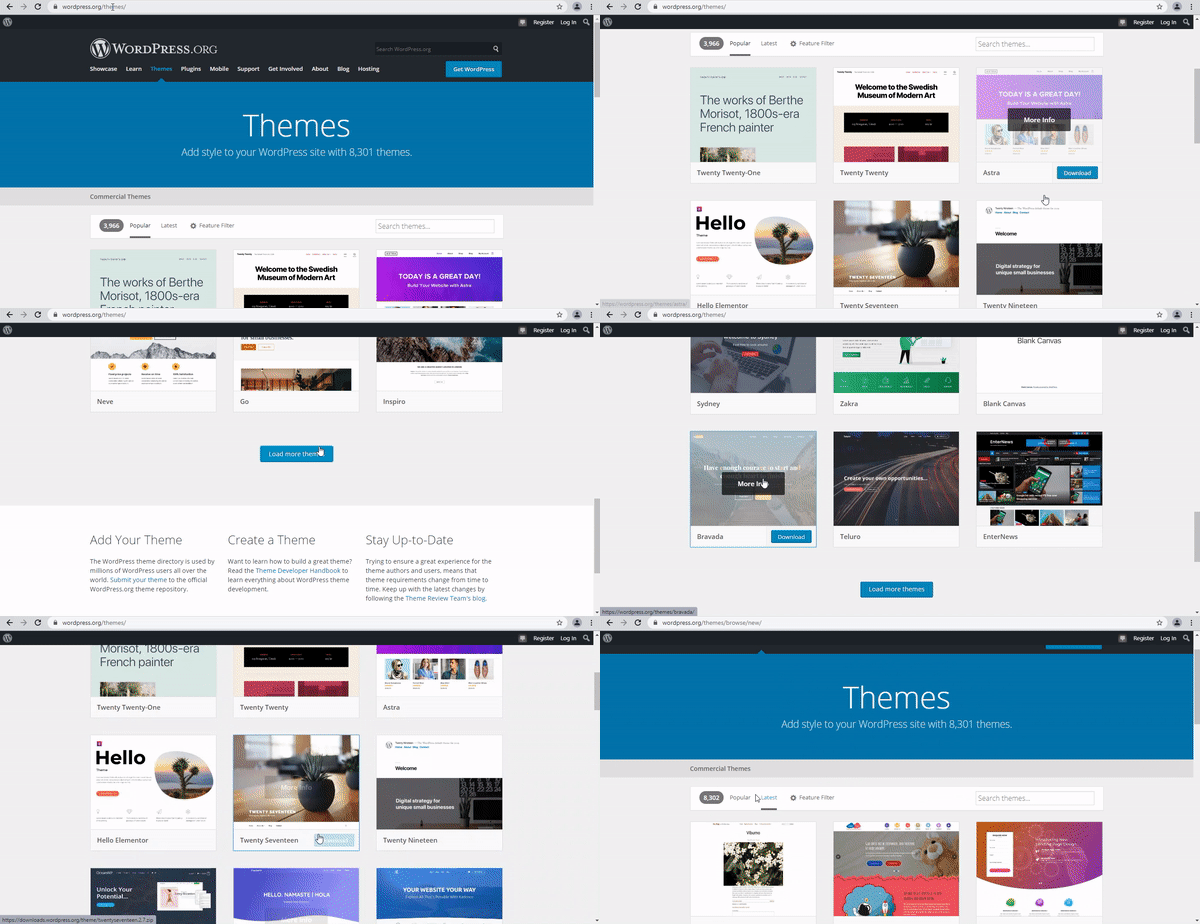
4.1 Choosing a Suitable Theme for Your Blog
Now comes the fun part—making your blog look snazzy. WordPress offers a vast selection of themes to suit every taste and niche. Whether you're into sleek minimalistic designs or bold and colorful layouts, there's a theme out there for you. Take your time to browse through the options and find a theme that complements your blog's personality. Remember, it's like finding the perfect outfit for your blog to strut its stuff.
4.2 Customizing Your Blog's Appearance
Once you've chosen a theme that tickles your fancy, it's time to put your personal touch on it. WordPress allows you to customize various aspects of your blog, from the logo and header to the colors and fonts. It's like giving your blog a fresh coat of paint and new curtains. So, don't be afraid to experiment and let your personality shine through. And remember, you can always change things up later if you're feeling adventurous.
And there you have it, a step-by-step guide to creating a blog in WordPress for beginners. Now it's time to unleash your creativity, share your thoughts with the world, and enjoy this exciting journey of blogging. Happy blogging!
5. Creating Engaging Content: Writing and Formatting Blog Posts
5.1 Planning Your Blog Content
So you've set up your blog, and now it's time to start filling it with amazing content. But before you dive headfirst into writing, take a moment to plan out your blog content. Think about what topics you want to cover, what your target audience would be interested in, and how you can provide value through your posts. Planning ahead will help you stay organized and ensure that your blog posts flow smoothly and cohesively.
5.2 Writing Compelling Blog Posts
Now that you have a plan, it's time to put pen to paper, or rather, fingers to keyboard, and start writing those blog posts. Remember, the key to writing compelling content is to be informative, engaging, and relatable. Share your unique insights, personal experiences, and don't be afraid to inject your personality into your writing. Keep your paragraphs short and concise, and use headings and subheadings to break up your content and make it easier to read.
5.3 Formatting Your Blog Posts with Headings, Images, and Links
Formatting is just as important as the content itself. Make your blog posts visually appealing and easy to navigate by using headings, images, and links. Headings help organize your content and make it scannable, allowing readers to quickly find the information they're looking for. Images, on the other hand, add visual interest and can help illustrate your points. Lastly, don't forget to include relevant links within your blog posts to other resources or related articles, providing additional value to your readers.
6. Managing Blog Categories and Tags for Effective Organization
6.1 Understanding the Importance of Categories and Tags
When it comes to organizing your blog, categories and tags are your best friends. Categories provide a broad way to group your blog posts based on topics, making it easier for readers to navigate your site. Tags, on the other hand, offer a more specific way to label and organize your posts. They can help improve the discoverability of your content and allow readers to find related articles easily. Understanding how to utilize categories and tags effectively will make your blog more organized and user-friendly.
6.2 Creating and Assigning Categories to Your Blog Posts
Creating categories for your blog is simple. Think about the main topics you'll cover and create a handful of broad categories that encompass them. When writing your blog posts, make sure to assign them to the appropriate category to ensure everything is neatly organized. This way, readers can easily browse through specific categories and find the content they're interested in without feeling overwhelmed.
6.3 Utilizing Tags for Enhanced Discoverability
Tags are like keywords that help identify the specific topics or themes covered in your blog posts. When creating tags, think about the specific details or keywords that readers might search for to find articles on a particular topic. This will help enhance the discoverability of your blog posts and make it easier for readers to find related articles. However, keep in mind not to go overboard with tags. Stick to a handful of relevant tags for each post to maintain clarity and avoid overwhelming your readers.
7. Enhancing Your Blog with Plugins and Widgets
7.1 Introduction to WordPress Plugins
One of the great things about WordPress is the wide range of plugins available to enhance the functionality and appearance of your blog. Plugins are like little add-ons that you can install to customize your website. There are plugins for everything from SEO optimization to social sharing buttons. Take some time to explore the vast plugin library in WordPress and find ones that suit your specific needs.
7.2 Essential Plugins for Every WordPress Blog
While the plugin library is vast, there are a few essential ones that every WordPress blog should have. For starters, an SEO plugin, like Yoast SEO, can help optimize your blog for search engines. A caching plugin, such as WP Super Cache or W3 Total Cache, can improve your website's loading speed. Additionally, a security plugin like Wordfence can help protect your blog from hackers. Make sure to explore these essential plugins and install the ones that will benefit your blog the most.
7.3 Adding and Configuring Widgets on Your Blog
Widgets are like little boxes of information that you can add to your blog's sidebar, footer, or other widget-ready areas. They can display things like recent posts, social media buttons, or an email subscription form. To add widgets to your blog, go to the Appearance section in your WordPress dashboard and click on Widgets. From there, you can drag and drop widgets into the desired areas and configure their settings. Experiment with different widgets to enhance the functionality and appearance of your blog.
8. Promoting and Growing Your WordPress Blog
8.1 Promoting Your Blog through Social Media and SEO
Creating great content is only half the battle; you also need to promote your blog to reach a wider audience. Utilize social media platforms like Facebook, Twitter, and Instagram to share your blog posts and engage with your followers. Additionally, optimize your blog for search engines by utilizing keywords, meta tags, and meta descriptions. This will help your blog rank higher in search engine results and attract more organic traffic.
8.2 Engaging with Your Audience: Comments and Feedback
Engaging with your audience is a crucial aspect of growing your blog. Encourage readers to leave comments on your blog posts and make sure to respond to them. This will foster a sense of community and encourage readers to keep coming back. Additionally, actively seek out feedback from your audience to improve your content and provide them with what they're looking for.
8.3 Analyzing and Monitoring Blog Performance
To gauge the success of your blog and make informed decisions, it's important to analyze and monitor its performance. Utilize tools like Google Analytics to track your website traffic, user behavior, and other important metrics. This will allow you to identify what's working and what needs improvement. Use this information to refine your blog strategy and continue growing your WordPress blog.In conclusion, creating a blog in WordPress is an accessible and rewarding endeavor for beginners. With its user-friendly interface and extensive customization options, WordPress empowers you to unleash your creativity and share your ideas with the world. As you continue to explore and learn more about WordPress, remember to keep experimenting, engaging with your audience, and refining your blogging skills. By following this step-by-step guide and continuously nurturing your blog, you are well on your way to building a successful online presence and connecting with like-minded individuals. Happy blogging!
FAQ-How to Create a Blog in WordPress
1. Can I create a blog in WordPress even if I have no prior coding experience?
Yes, absolutely! WordPress is designed to be beginner-friendly, and you do not need any coding knowledge to create and manage a blog on this platform. It offers a user-friendly interface and intuitive tools that make it easy to customize your blog's appearance, write and format content, and manage various aspects of your blog without any coding skills.
2. Are there any costs involved in creating a blog in WordPress?
While WordPress itself is free to use, there are some costs associated with creating a blog. You will need to purchase a domain name (such as www.yourblogname.com) and a hosting plan to make your blog accessible on the internet. Additionally, some premium themes and plugins may come with a price tag if you choose to use them. However, there are also plenty of free themes and plugins available that can help you create a professional-looking blog without spending any money.
3. Can I switch my blog's theme after it's already live?
Yes, you can change your blog's theme even after it is live. WordPress allows you to switch themes seamlessly without losing your existing content. However, it's important to note that changing themes may affect your blog's appearance and some customization settings. It's recommended to preview and test a new theme before fully activating it, and consider taking a backup of your blog just in case any issues arise during the switch.
4. How can I promote my WordPress blog and attract more readers?
Promoting your WordPress blog involves various strategies, such as utilizing social media platforms to share your content, optimizing your blog for search engines (SEO), engaging with your audience through comments and feedback, and networking with other bloggers in your niche. Additionally, regularly creating high-quality and valuable content, promoting your blog through email newsletters, and participating in relevant online communities can also help attract more readers to your WordPress blog.
How to Create a Blog in WordPress?
Here's a step-by-step guide on how to create a blog in WordPress:
Step 1: Sign up for a WordPress Account Visit the WordPress website and click on the "Get Started" button. Fill in your details to create an account. Don't worry, it's free and there's no trial period or credit card required.
Step 2: Choose a Domain Name Select a domain name for your blog. This will be the web address where your blog will be located. Choose something catchy and relevant to your blog's topic.
Step 3: Select a Hosting Plan WordPress offers different hosting plans to suit your needs. Choose the plan that best fits your requirements and budget.
Step 4: Install WordPress Once you've selected your hosting plan, follow the instructions to install WordPress on your domain. This process is usually straightforward and can be done with just a few clicks.
Step 5: Customize Your Blog After installing WordPress, you can start customizing your blog's appearance. Choose a theme that reflects your style and brand. You can also customize the colors, fonts, and layout to make it unique.
Step 6: Create Your First Blog Post Now it's time to start writing! Click on the "Posts" tab in your WordPress dashboard and select "Add New." Give your blog post a title and start writing your content. You can format your text, add images, and even embed videos to make your blog post engaging.
Step 7: Publish Your Blog Post Once you're happy with your blog post, click on the "Publish" button to make it live on your website. Congratulations, you've just created your first blog post in WordPress!
Step 8: Promote Your Blog Now that your blog is live, it's time to promote it. Share your blog posts on social media, engage with your audience, and optimize your content for search engines to attract more readers.
That's it! You've successfully created a blog in WordPress.
6. can a beginner learn How to Create a Blog in WordPress
Absolutely! WordPress is designed to be beginner-friendly, and many beginners have successfully learned how to create a blog using WordPress. The platform offers a user-friendly interface, intuitive tools, and plenty of resources to guide you through the process.
As a beginner, you can start by signing up for a free WordPress account and exploring the various themes and customization options available. WordPress provides step-by-step instructions and tutorials to help you get started. Additionally, there are numerous online resources, forums, and communities where you can seek guidance and support from fellow bloggers.
WordPress also offers a vast library of plugins that can enhance your blog's functionality and design without requiring any coding knowledge. These plugins allow you to add features like contact forms, social media sharing buttons, SEO optimization, and more.
Remember, learning any new skill takes time and practice. Take it one step at a time, and don't hesitate to experiment and explore different features within WordPress. With a little patience and determination, you'll be able to create a beautiful and functional blog using WordPress.
How to Create a Blog in WordPress is easy
How to create a blog in WordPress is indeed easy, especially for beginners. WordPress provides a user-friendly interface and intuitive tools that make the process straightforward.
How to Create a Blog in WordPress is cheap
How to create a blog in WordPress can indeed be cost-effective, especially if you choose the free options available. WordPress offers a free plan that allows you to create a blog without any upfront costs. With this free plan, you can enjoy basic features and functionality to get your blog up and running.
However, it's important to note that there may be additional costs involved if you opt for certain premium features or if you decide to purchase a custom domain name. WordPress also offers various paid plans and hosting options that provide more advanced features and customization options.
If you're looking for a more budget-friendly option, you can start with the free plan and gradually upgrade as your blog grows and your needs evolve. This allows you to keep your initial costs low while still having the flexibility to expand your blog's capabilities in the future.
Additionally, WordPress has a vast community of developers and designers who create free and affordable themes and plugins that you can use to enhance the design and functionality of your blog without breaking the bank.
Ultimately, the cost of creating a blog in WordPress can vary depending on your specific needs and preferences. Whether you choose to stick with the free plan or invest in premium features, WordPress offers a range of options to suit different budgets.
7. Why Learn How to Create a Blog in WordPress
Learning how to create a blog in WordPress can be incredibly beneficial for several reasons:
- Easy to use: WordPress provides a user-friendly interface and intuitive tools that make it easy for beginners to create and manage a blog. You don't need to have extensive technical knowledge or coding skills to get started.
- Customization options: WordPress offers a wide range of themes, templates, and plugins that allow you to customize the design and functionality of your blog. You can create a unique and visually appealing blog that aligns with your brand or personal style.
- SEO-friendly: WordPress is known for its search engine optimization (SEO) capabilities. It provides built-in features and plugins that help optimize your blog for search engines, making it easier for your content to be discovered by a wider audience.
- Community support: WordPress has a large and active community of users, developers, and designers who are always ready to help and provide support. You can find tutorials, forums, and resources to assist you in learning and troubleshooting any issues you may encounter.
- Scalability: WordPress is a highly scalable platform, meaning you can start with a simple blog and expand it into a full-fledged website or even an e-commerce store. As your blog grows, you can add new features and functionalities to meet your evolving needs.
- Career opportunities: Learning how to create a blog in WordPress can open up various career opportunities. Many businesses and organizations rely on WordPress for their websites and blogs, so having WordPress skills can be valuable in the job market.
Overall, learning how to create a blog in WordPress empowers you to share your ideas, connect with your audience, and establish your online presence. It's a versatile and powerful platform that can help you achieve your blogging goals.
Starting a Blog with WordPress

Starting a Blog with WordPress
Starting a blog with WordPress is an efficient and effective way to establish a professional online presence. With its user-friendly interface and extensive customization options, WordPress provides a comprehensive platform for individuals and businesses alike. Its vast library of themes allows bloggers to create visually appealing websites that reflect their personal brand or industry expertise. Moreover, the plethora of plugins available enables bloggers to enhance the functionalities of their site, adding features such as social media integration, search engine optimization, and analytics tracking.
In addition to being responsive and mobile-friendly, WordPress also offers seamless integration with various third-party tools and services, facilitating seamless content creation and distribution across multiple platforms. Furthermore, its robust security measures ensure the protection of valuable data while providing peace of mind to users concerned about cyber threats. Overall, starting a blog with WordPress empowers professionals by providing them with the necessary tools to establish a credible online presence and effectively engage with their target audience.
Conclusion-How to Create a Blog in WordPress
Creating a blog in WordPress is a simple and straightforward process that allows you to unleash your creativity and share your unique voice with the world. By following the step-by-step guide outlined above, you can set up your blog, customize its appearance, and start publishing your captivating content. Remember to promote your blog through social media and optimize it for search engines to attract a wider audience. With WordPress, you have the power to build a successful blog that establishes your authority and connects with your target audience. So, what are you waiting for? Start your blogging journey with WordPress today!